Receipt scanning
Scan a receipt, split it by what people had
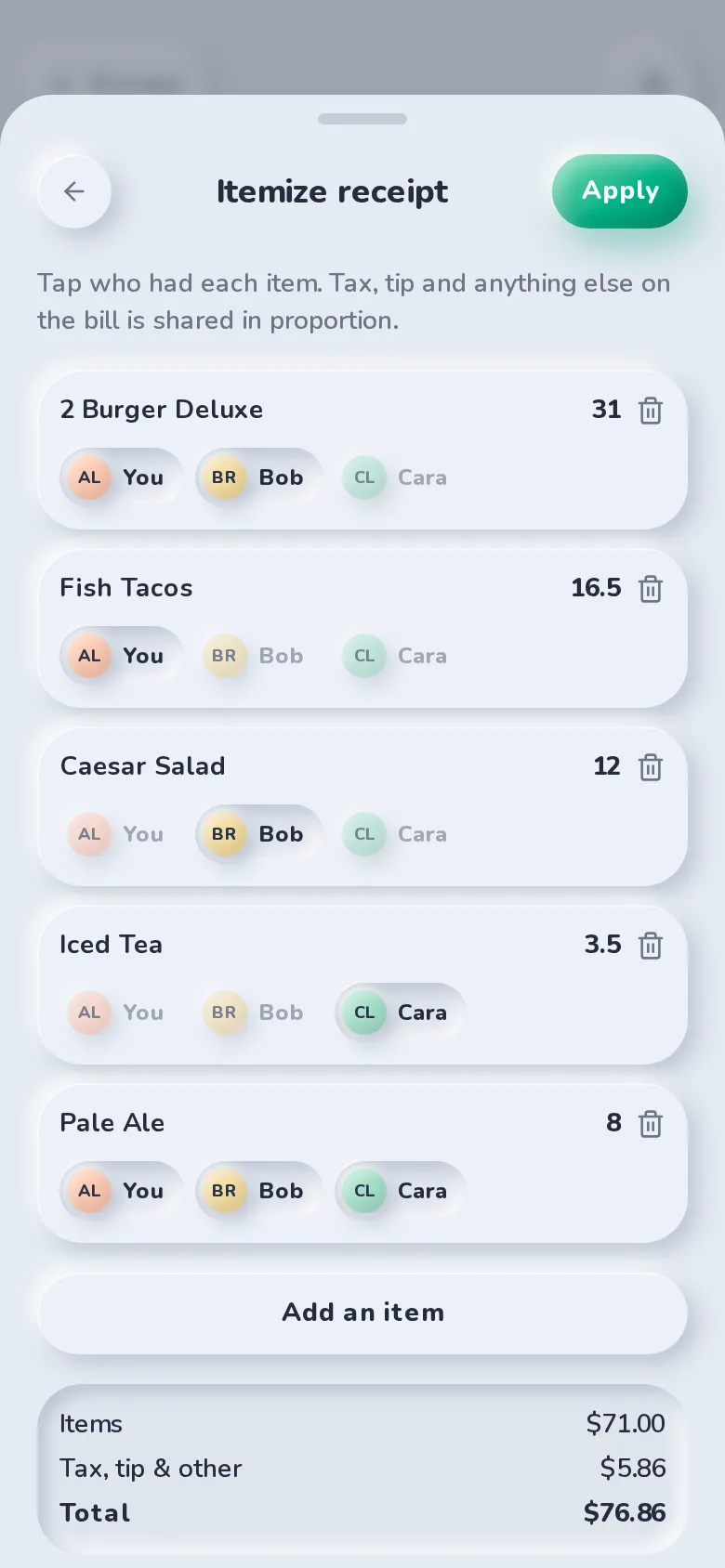
Tap the receipt button, take a photo or pick one, and SplitBank reads the merchant, date, items and total right on your phone. Then tap who had what, and tax and tip are shared in proportion.
Read on your phone
The receipt is read on your device, not sent to a scanning service. SplitBank checks that the items, tax and tip add up to the total, and tells you when something looks off so you can fix a number before saving.
Itemize in a few taps
Open Itemize to say who had what. It works with a group or with friends.
- Everyone shares every item to start; tap people off the things they didn’t have.
- Fix an item’s name or price if the photo was hard to read.
- Tax, tip and fees are split in proportion to what each person had, down to the cent.
The photo stays with the expense
A small copy of the receipt is saved on the expense so anyone on it can check it later. Delete the expense and the photo goes with it.
FAQ
Receipt scanning: common questions
Yes. Like everything else in SplitBank, there’s no paid tier to unlock it.
Printed receipts photographed flat, in good light, with the whole receipt in the frame. E-receipts saved as a PDF work too. If a number is misread, edit it before you save.
Related
Flexible splits
Equal, exact, percentage, shares or adjustments — with live per-person totals.
Learn more about flexible splitsStatement import
Upload a statement, then split transactions in one tap.
Learn more about statement importSettle up
Pay with the apps you already use, or record cash.
Learn more about settle up
Start splitting in under a minute
Free to use, with no subscription or credit card. Invite your group and add your first expense today.